
How much does ScanSkinAI cost for a spa or salon?
A staff operator seat costs US$59.99 per year, billed annually. Each seat is for one logged-in staff operator. Hosted customer scan credits and optional Pro services are separate purchases.
Run a one-minute facial scan, simulate treatment outcomes and send a branded consultation report from your phone or iPad — recommend treatments and capture consultation leads without a hardware imaging booth. Designed for solo practitioners and boutique clinics.
Billed annually. One seat is for one logged-in staff operator.
Also included: unlimited benefit & treatment-offer listings in the Lavender membership benefits marketplace.Explore partner benefits
Fair use: unlimited normal in-spa scanning during genuine client consultations. Automated, shared-login, resale or bot usage is not included.
Used by independent aesthetic clinics & med spas across the UK, United States, Australia and New Zealand
Built for solo practitioners and boutique clinics that want objective facial analysis without a capital equipment purchase.
One flat seat price instead of a five-figure imaging-system purchase and finance plan.
Works in the browser on devices you already own — no booth taking up treatment-room space.
No maintenance agreements or per-scan click fees. Start consulting the same day.
Comparing options? Read ScanSkinAI vs VISIA. At US$59.99 a year, one consultation typically covers the cost.
A frontal photo on iPad produces a scored report across 12 visible skin metrics in about a minute.
Face Studio shows an illustrative preview of 1–4 combined treatments on the client's own photo.
Send a report with your clinic logo to the client's phone or email after the consultation.
Recommendations map to your own retail products and treatment menu, not generic brands.
For US$59.99 per year, one Enterprise staff seat also lets your clinic voluntarily join the ScanSkinAI Lavender partner programme and list unlimited benefits and treatment offers in our membership benefits marketplace — with no additional listing fee.
Introduce your clinic to eligible Lavender cardholders within ScanSkinAI’s 1M+ user community. Share member discounts, treatment packages or added-value benefits, with your clinic’s location, offer terms and booking details.
Curious what members actually see? Browse the Member Benefits Partner Network to review how participating clinics present their offers, locations and terms.
An active paid Enterprise owner can opt in. No extra staff seats or Pro add-ons are required.
Publish approved member benefits and treatment offers. You choose the terms and fund the benefit.
Members pay your clinic directly. Existing scans, credits and clinic tools stay separate.
Participation is optional. Clinic and offer approval, card tier, location and offer terms apply. The 1M+ figure refers to the wider ScanSkinAI community, not activated Lavender cards or guaranteed offer views or bookings.
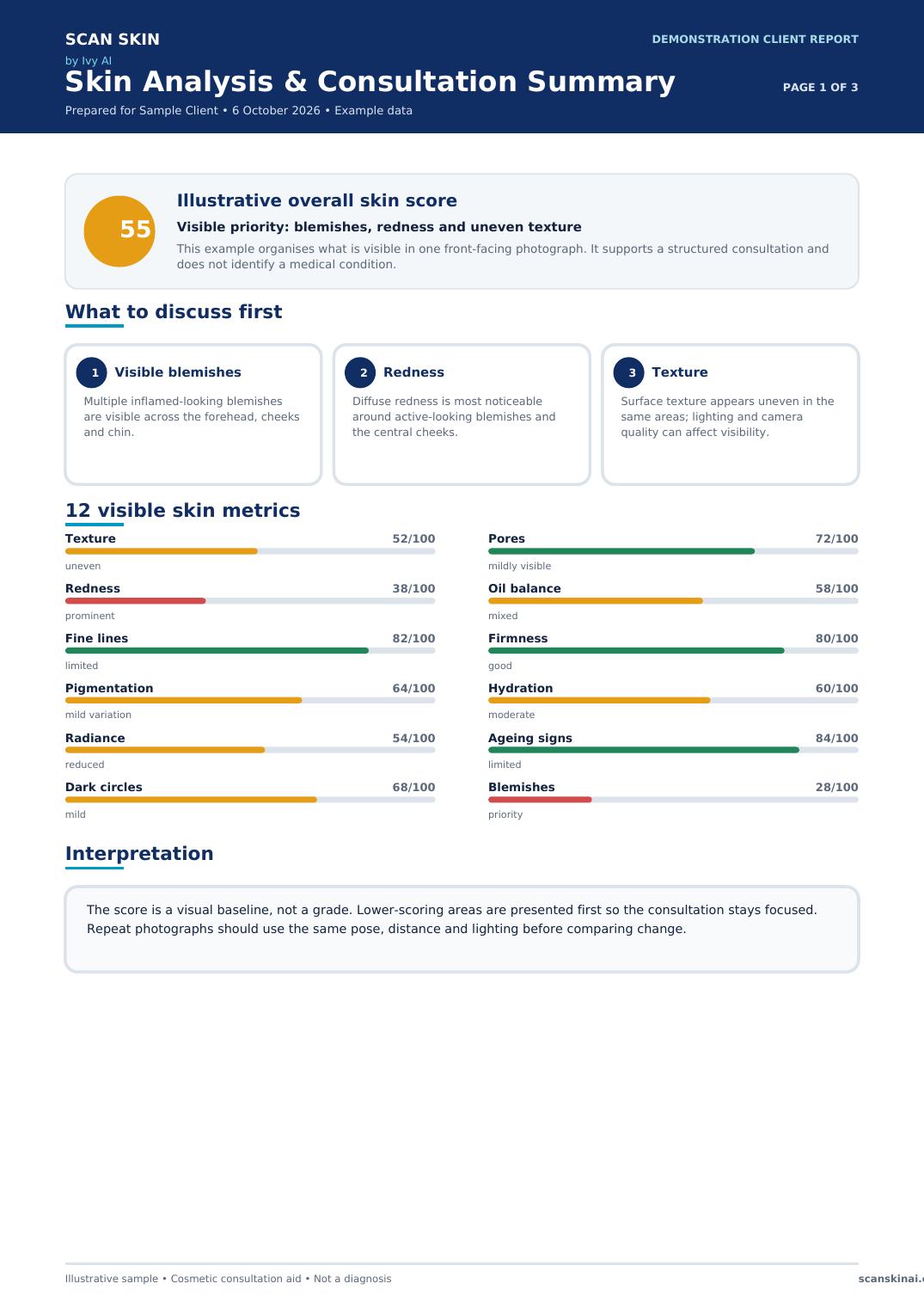
Review the demonstration report before you subscribe. It moves logically from visible priorities and 12 metrics to a matched full-face preview, then a practical consultation pathway with questions and safety guidance.
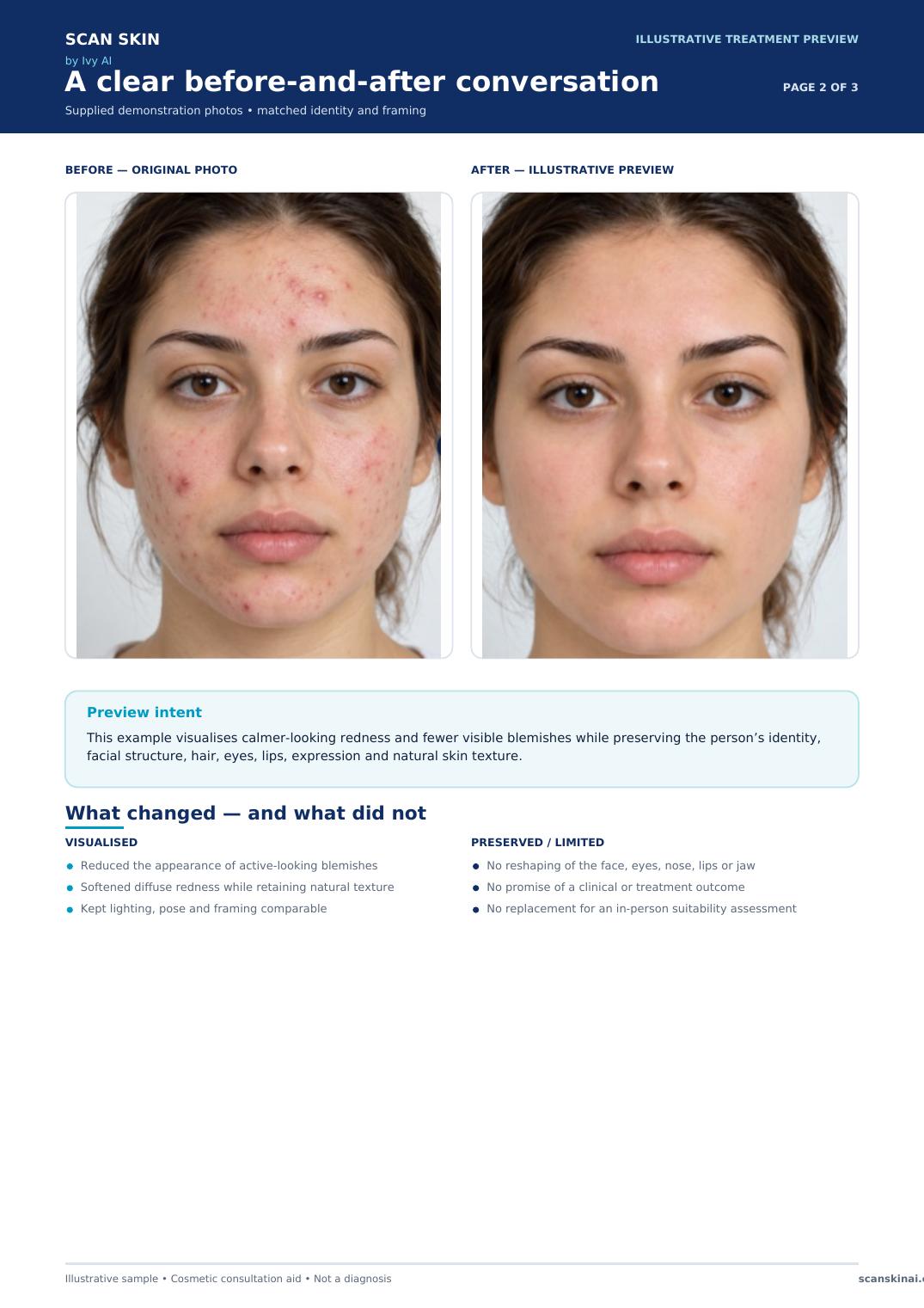
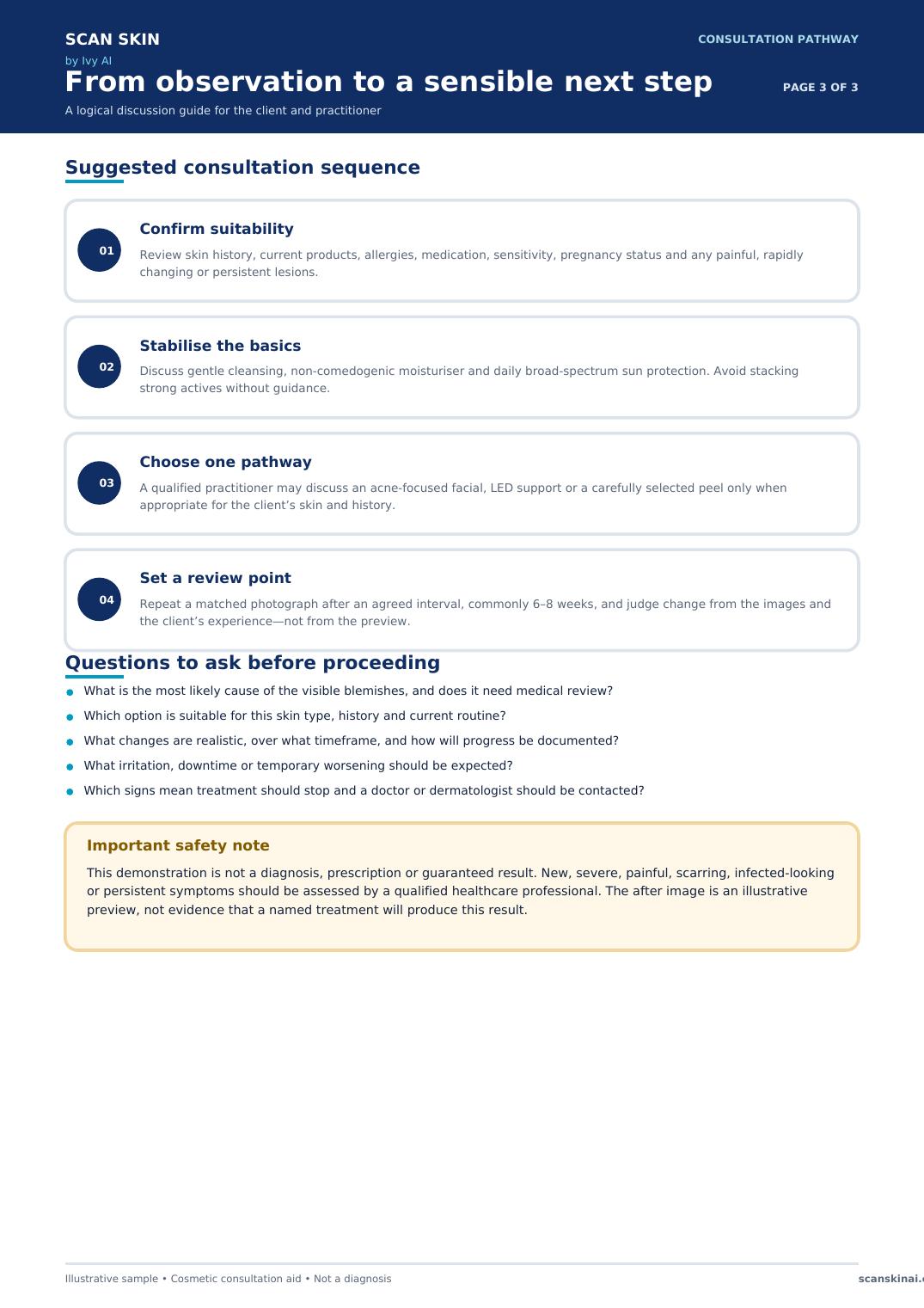
A simple workflow your team can repeat at the first visit and at follow-ups. Compare this software-led approach with a VISIA system or review the wider clinic skin-analysis workflow.
Take one clear, front-facing photo on your existing phone or tablet.
Walk through the scores, visible concerns and client-ready report together.
Connect the discussion to relevant services and products from your own menu.
Repeat under similar conditions and compare visible changes across visits.
Read the published case-study record for an independent cosmetics boutique using ScanSkinAI on an iPad for consultations, recommendations and follow-up. Results are reported as that customer’s experience and are not a guarantee for another business.
Staff access, customer-led scans and specialist Pro tools are separate, so you only pay for the way you work.
US$59.99 / operator / year
Billed annually. Unlimited genuine in-spa scans under fair use.
Separate one-time credit packs
For customers scanning themselves through your branded public link or QR code. One credit is used per completed customer scan; credits do not expire.
See hosted scan credit packsFrom US$29/month per location
Facial Analysis Pro and Face Studio Pro (US$99/month each, 500 uses per month) add advanced analysis and treatment simulations. Voice Pro (US$29/month, 30 hours) transcribes consultations live with automatic language detection.
Compare optional Pro servicesA single operator seat costs about US$5 per month when spread across the year. Your return depends on your prices, bookings and staff adoption; use the ROI calculator with your own figures rather than relying on a promised result.
A staff operator seat costs US$59.99 per year, billed annually. Each seat is for one logged-in staff operator. Hosted customer scan credits and optional Pro services are separate purchases.
Yes. One active paid Enterprise seat at US$59.99 per year includes optional Lavender partner participation and unlimited benefit and treatment-offer listings, with no additional marketplace listing fee. Your clinic and offers must be approved. ScanSkinAI has a global community of 1M+ users; offers are available to eligible, opted-in Lavender cardholders, not automatically every account. You set and fund your offers, and members pay your clinic directly. Visibility and bookings are not guaranteed.
It covers normal staff-led scans during genuine client consultations. Shared logins, automated or bot traffic, reselling access and unusually abusive usage are not included.
ScanSkinAI runs in a modern web browser on the phone, tablet or laptop you already own. No dedicated camera booth or analysis machine is required.
Most teams can create an account, buy a seat and run their first staff-led scan the same day. There is no hardware installation; consistent lighting and a clear front-facing photo produce the most useful comparisons.
The separate hosted scan page can display your clinic name, logo, colours, introduction and booking button. Staff-led reports and supported shareable assets can also carry company branding.
Client photos and records are private and company-scoped, encrypted in transit and at rest, and protected by role-based access. Photos are used to provide the service and are not sold. A data processing agreement is available on request.
Yes. Saved client history lets staff compare scans from different visits. For meaningful comparisons, use a similar camera position, pose and lighting each time; the results are cosmetic consultation aids, not a medical diagnosis.
Customer-facing hosted scans use separate one-time credit packs. Facial Analysis Pro and Face Studio Pro are optional at US$99 per month per location, each with 500 uses per month. Voice Pro consultation transcription is US$29 per month with 30 hours included (US$9 per extra 10 hours). The annual staff seat remains a separate subscription.
Need customer-led acquisition? See how the hosted scan page works and how consenting contacts flow through medical spa lead generation. Already a participating clinic? Your listings reach members through the Member Benefits Partner Network.
Start with one annual staff seat, or book a walkthrough using the phone or tablet your team already owns.
Answer two questions and we'll point you to the setup that fits your size and goal.
Not sure? Solo businesses usually start with a US$59.99 seat, groups of 3–10 locations with the two Pro add-ons, and lead-focused spas with the Hosted Scan Page.
Clients don't just buy treatments — they buy confidence, progress and a relationship. AI skin scanning gives them a reason to trust you every single visit.
A personalised scan shows you understand their skin — not just sell to it. That trust is what turns a walk-in into a regular.
Before-and-after tracking and progress charts prove the value of every facial, peel or treatment — in numbers they understand.
When clients can watch their skin improve over time, rebooking stops feeling like sales pressure and starts feeling like self-care.
"The spas that keep clients longest don't sell more treatments — they show clients why the treatments worked."
ScanSkinAI is built to turn every scan into a visible skin story your team can use to recommend, retain and grow with confidence.
Everything your clinic or spa needs to deliver a premium, data-driven skin experience.
Our standalone AI facial scan app — analyse skin texture, tone, hydration, fine lines, and more. Scan walk-in clients instantly. No hardware, no complex setup.
Access the full ScanSkinAI skin health platform — skin condition monitoring, health tracking, and personalised skin insights. Ideal for VIP clients with ongoing skin journeys.
Every facial scan produces a full AI skin report your client can read in seconds and your therapist can use to recommend the right treatment, product or membership plan.
A single 0–100 number — your client's most important skin health metric, calculated from all 12 underlying skin signals.
Easy-to-share results like "Your skin looks 4 years younger than your actual age" — perfect for showcasing treatment ROI.
A second 0–100 score covering hydration, barrier health and visible condition — tracked scan over scan.
AI-classified skin type (Combination, Oily, Dry, etc.) with a confidence rating — so recommendations stay consistent.
Each metric is scored individually and plotted on a visual spider (radar) chart so clients can read their report at a glance.
Primary Concerns are highlighted automatically (e.g. "Visible pores and uneven texture") so your therapist immediately knows where to focus the consultation.
Charts visualise skin improvement over the client's last 10 scans — perfect proof for facials, peels, laser and injectable programmes.
See how each client's skin compares to others at the same age — a powerful conversation starter for upselling memberships and treatments.
Every visit is saved against the client's profile, so therapists can open the full skin journey on any device in seconds.
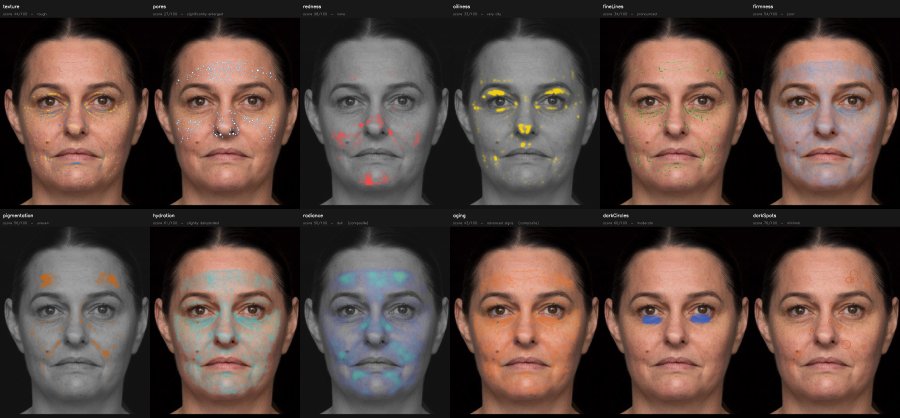
Alongside scores and written insights, ScanSkinAI can produce standard-photo-derived visualisations that help clients understand visible skin patterns and help teams explain recommendations with confidence.
One front-facing photo
App and API output examples
Complete visual report
The app can present a visual panel for each reported metric, while API customers can use the returned analysis data and generated visual assets inside their own branded experience.
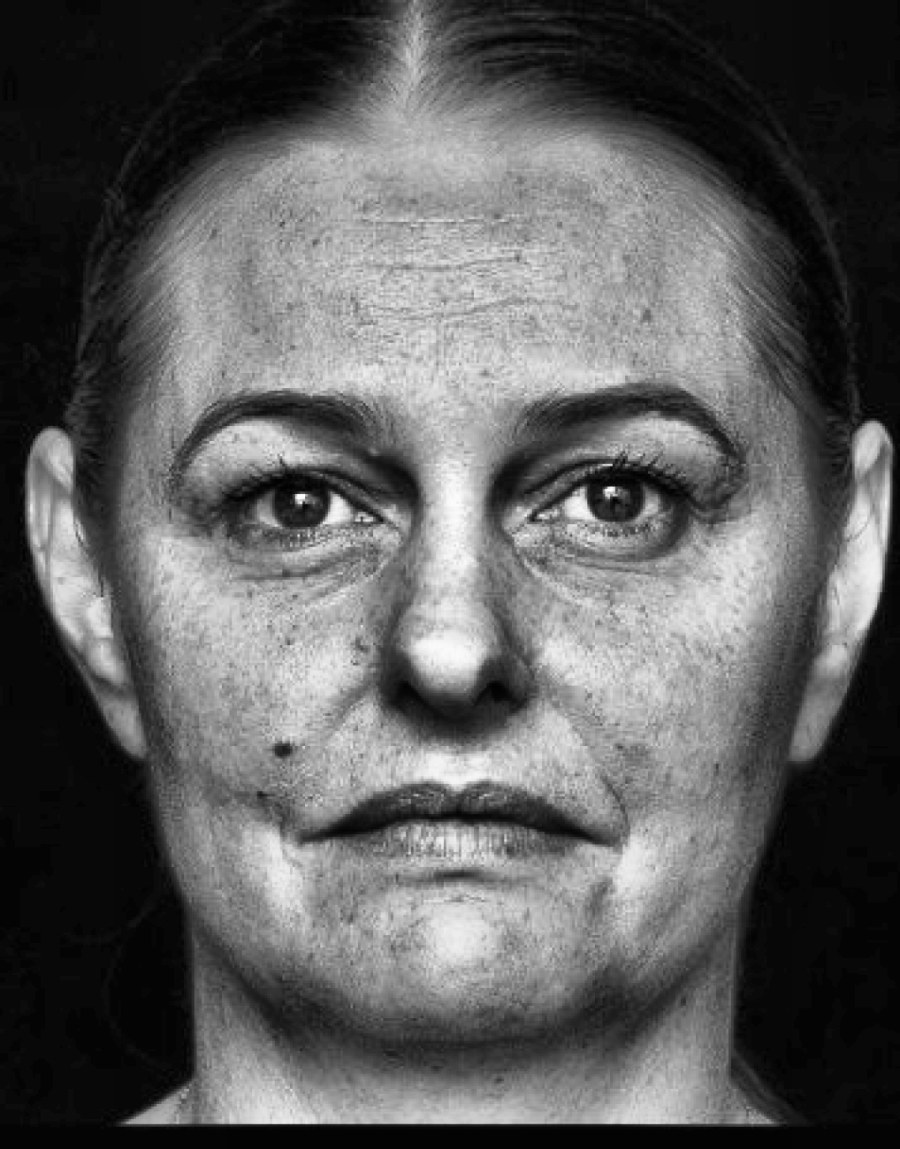
A high-clarity monochrome rendering reduces colour distraction so therapists can discuss visible texture, pores and fine-line patterns more clearly.
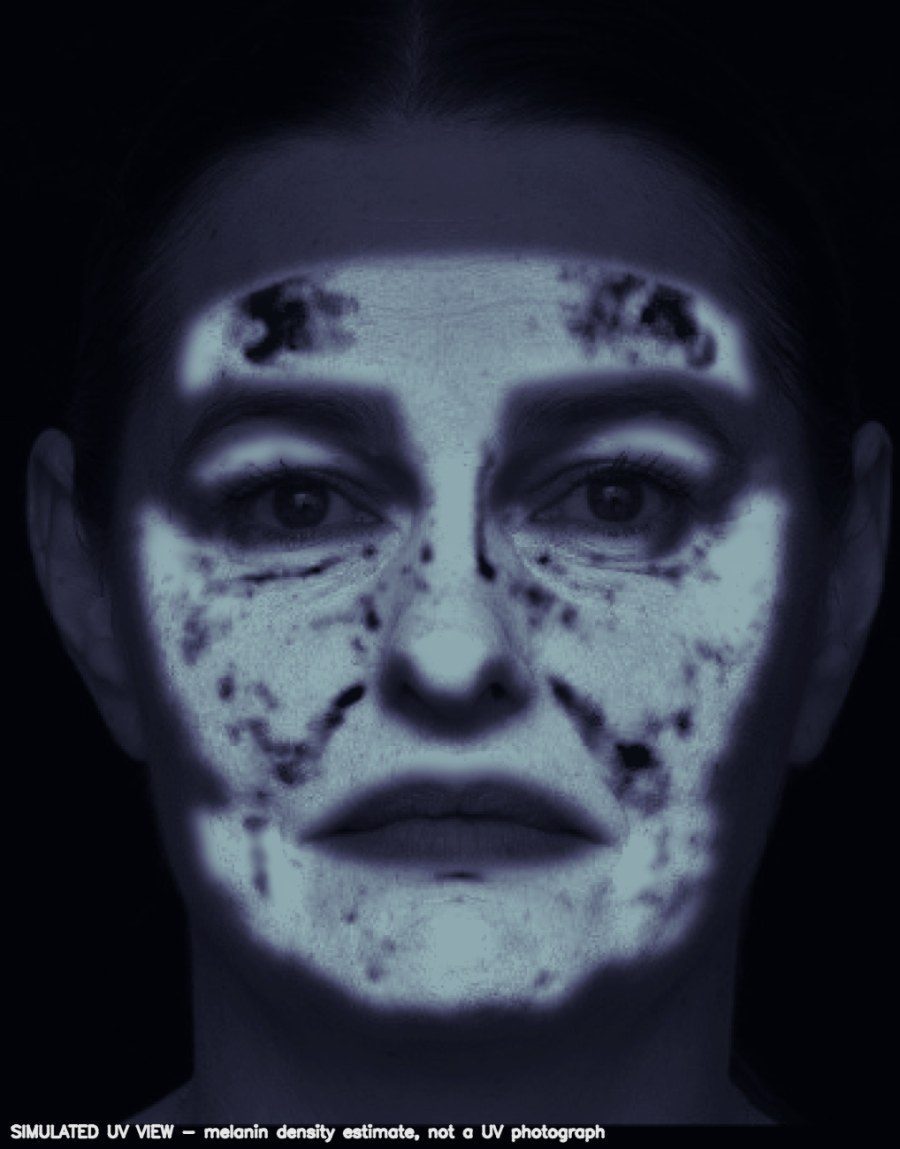
A UV-style visual estimate helps explain the distribution of visible pigmentation signals. It is generated from a standard photo and is not a UV photograph.
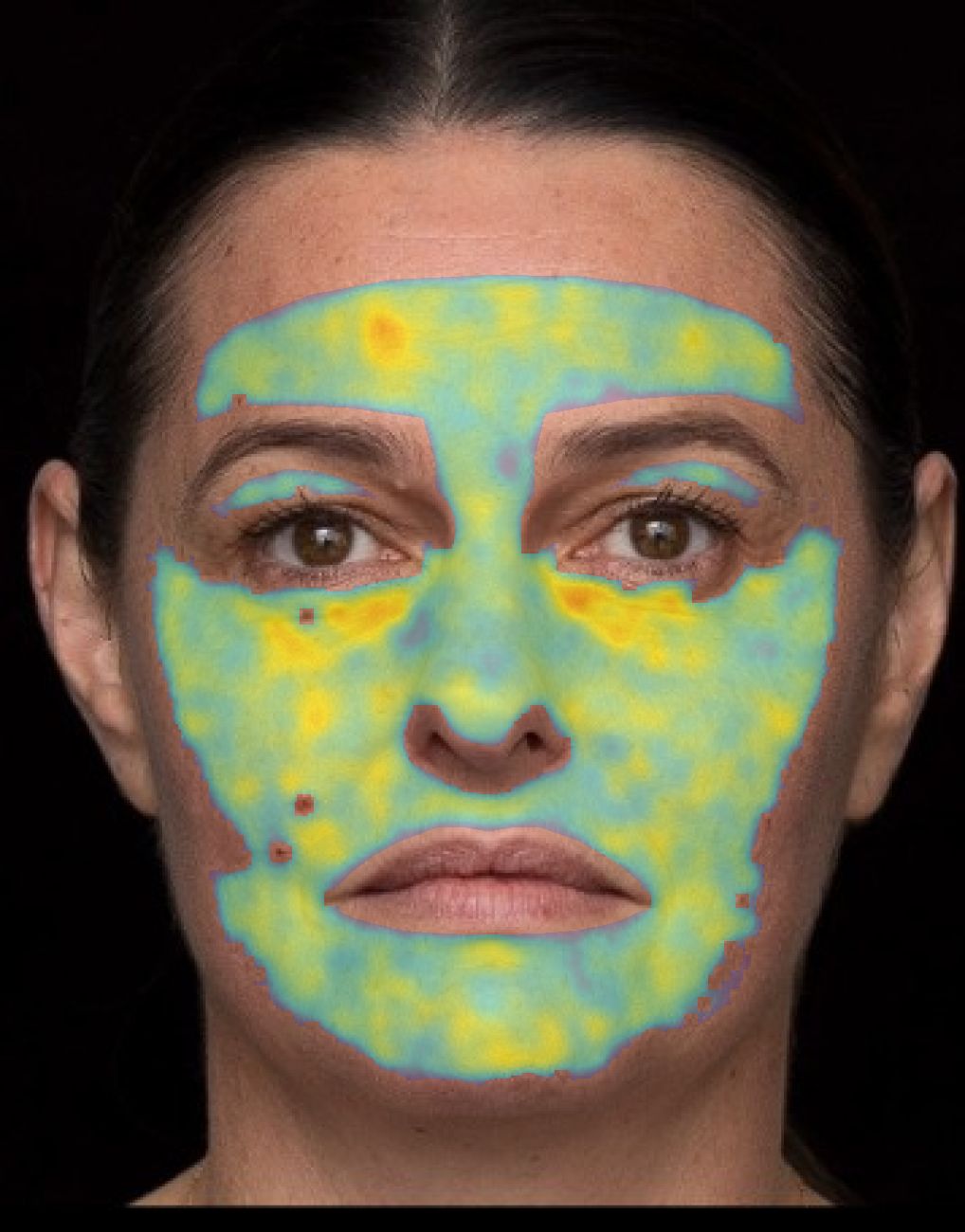
A colour-coded overlay makes differences in visible surface texture easier to locate and compare across facial zones during a consultation.
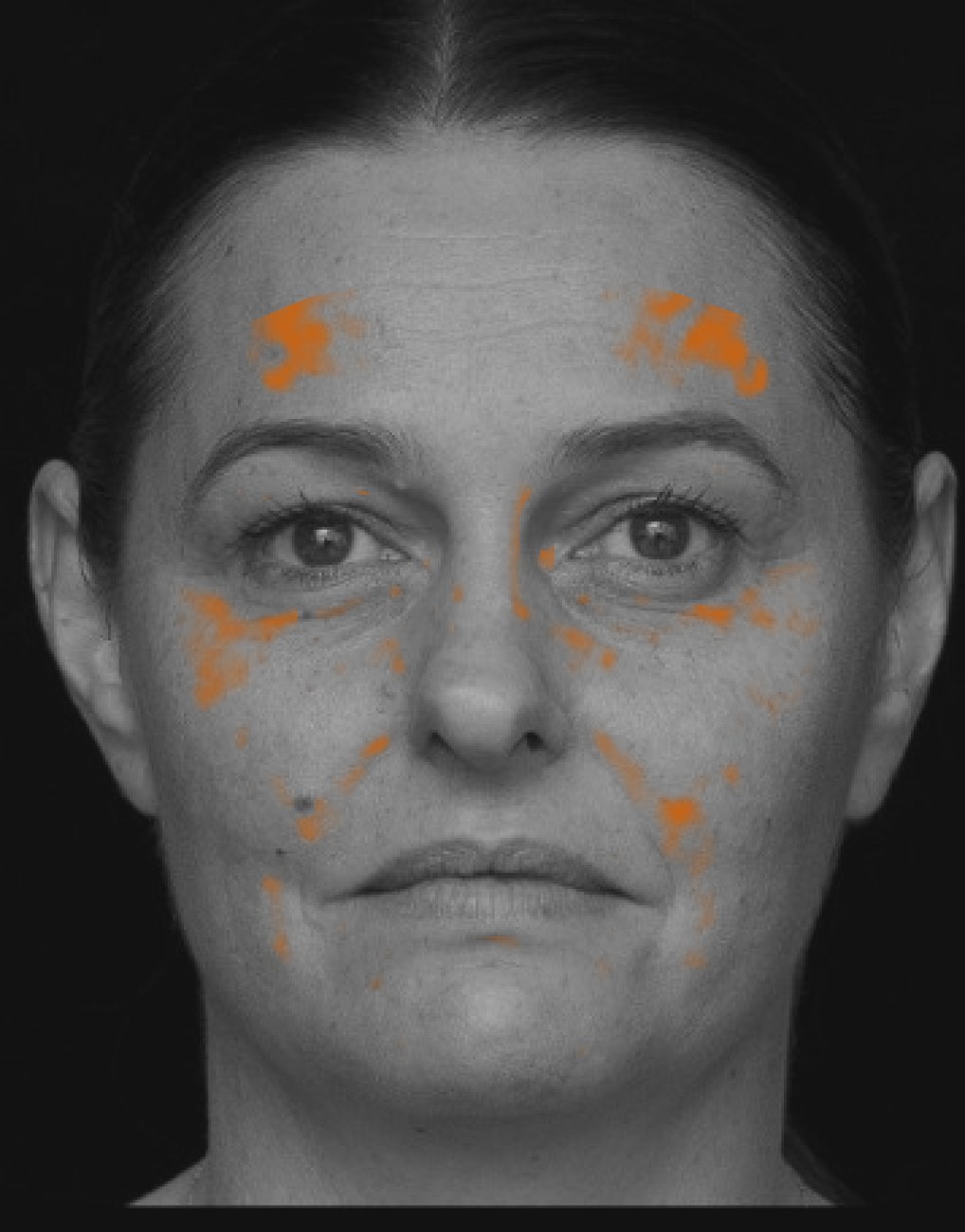
Highlighted regions draw attention to visible brown-spot and pigmentation patterns, supporting consistent discussion and follow-up comparisons.
Face Studio turns one front-facing photo into an illustrative appearance preview your client can actually see. Fifteen facial areas — from forehead lines to the jawline and neck — are adjusted independently, side by side with the untouched original, so the consultation is a conversation about a specific area rather than a brochure.
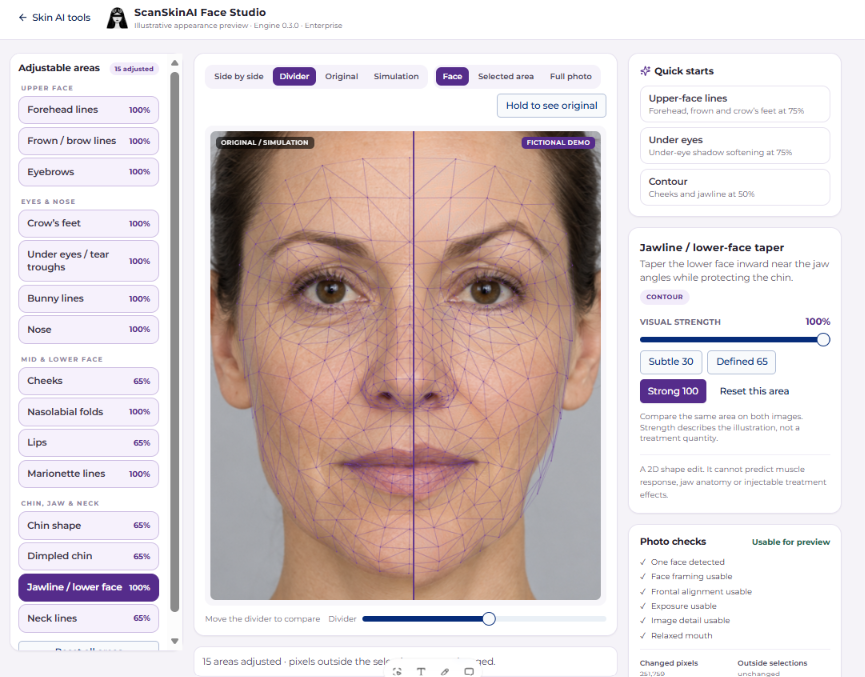
Each area has its own visual strength slider with Subtle, Defined and Strong presets, plus one-tap quick starts for upper-face lines, the eye area and facial contour.
Side by side, a draggable divider, original only or simulation only — with a hold-to-see-original control and zoom to the whole photo, the face, or just the area being discussed.
Export the original and the illustration together, permanently labelled as a simulation, so nothing leaves the room that could be mistaken for a treatment outcome.
Face mapping and rendering run on the device during the session. The original pixels stay the source for every render, and a consent step precedes any client photo.
Upper face
Eyes & nose
Mid & lower face
Chin, jaw & neck
What it is — and what it is not
Face Studio is an illustrative 2D appearance edit driven by AI face mapping and deterministic code. It does not predict a treatment result, muscle response, product quantity or healing, and it is not a diagnosis. Visual strength describes the illustration only.
Included with Enterprise seats
Facial simulation sits alongside the facial scan in the Skin AI tools area and unlocks on paid Enterprise seats — the same seats that give your team unlimited scans under fair use.
Try the client experience
The public demonstration includes a 12-metric skin scan, guided treatment plan, one illustrative before-and-after preview and a downloadable sample report.
Extend the same professional consultation experience to the abdomen, thighs, arms, back, neck and other treatment areas. Body Assessment turns photographs and practitioner observations into a structured, consultation-ready record — without inventing AI findings or making a diagnosis.
Step 1
Use the same company-scoped Client Profile ID across Body Assessment, Facial Analysis Pro and Face Studio Pro.
Step 2
Add a neutral overview, side view, tensed or pinch view and a close-up from a phone or tablet.
Step 3
Select the body area and concerns, then document severity, classifications, measurements, symptoms and clinical notes.
Step 4
Link treatments from your own active library, with optional AI suggestions restricted to services your clinic already offers.



Every saved assessment becomes a private, company-issued consultation report.
Turn a single front-facing photo into descriptive 2D facial geometry — face-shape proportions, jaw outline and chin position — drawn as a contour overlay on the client's own photo. Built for aesthetic consultations: proportions are shown as measurements only, never scores, grades or medical norms, so the conversation stays honest and consultative.
Step 1
Use the same company-scoped Client Profile ID shared with Facial Analysis Pro, Face Studio Pro and Body Assessment.
Step 2
One front-facing photo is all it takes — upload, camera or a VISIA export. Optional left and right oblique views add more context.
Step 3
Face-shape proportions, jaw outline and chin position are drawn as a contour overlay on the client's own photo, with tap-to-highlight findings.
Step 4
An AI-drafted talking guide built from your clinic's own treatment list, tap-to-select consultation records and a private company-branded report.
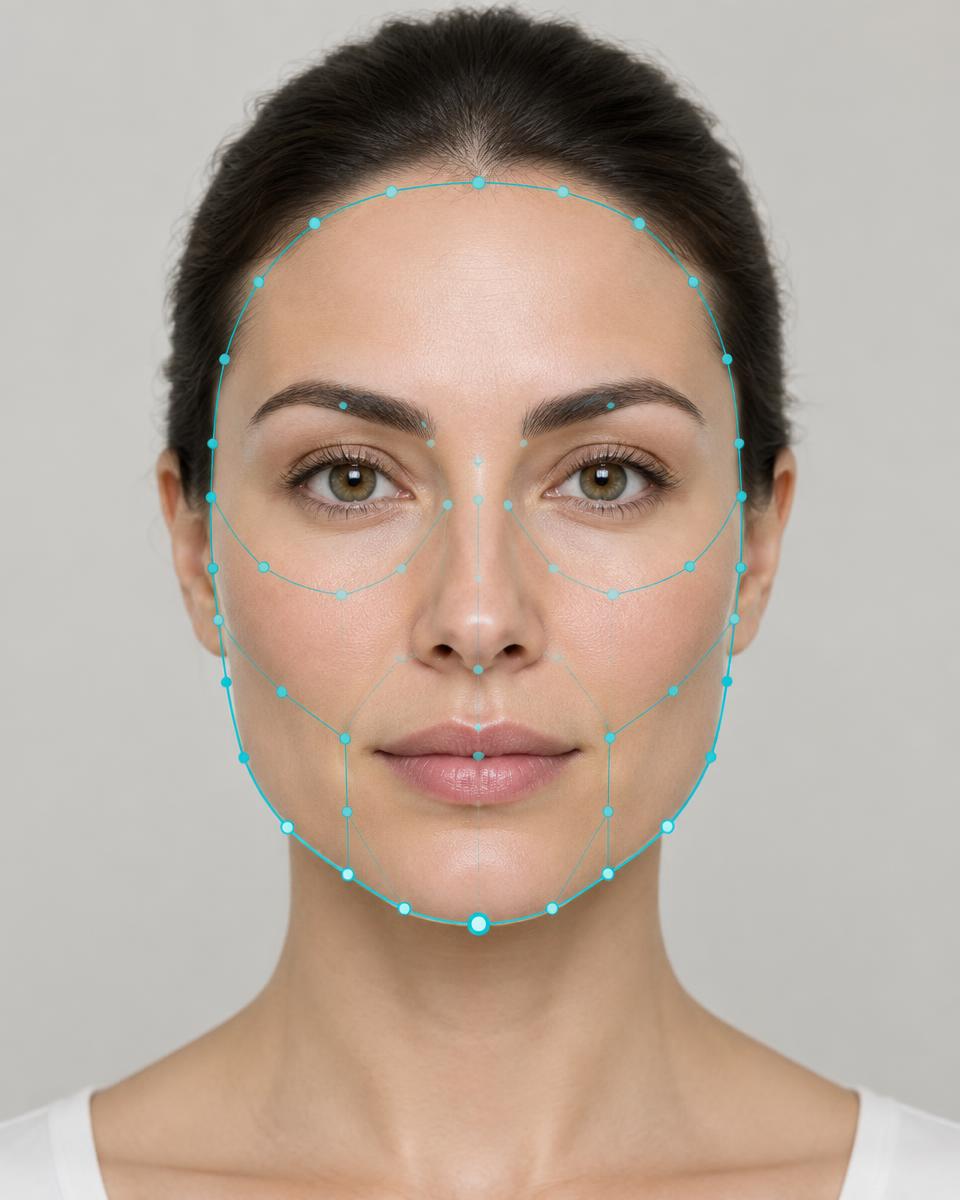 Fictional AI-generated client
Every scan becomes a structured, consultation-ready session — not just a picture.
Already have Enterprise seats? Two optional add-ons upgrade your consultation room: one shows clients a deeper analysis of their skin, the other shows them what a treatment could change. Each is US$99 per month, per location.
Advanced AI facial skin analysis with 12 metrics, concern overlays, heatmaps and annotated high-resolution views — built for consultation rooms that sell outcomes.
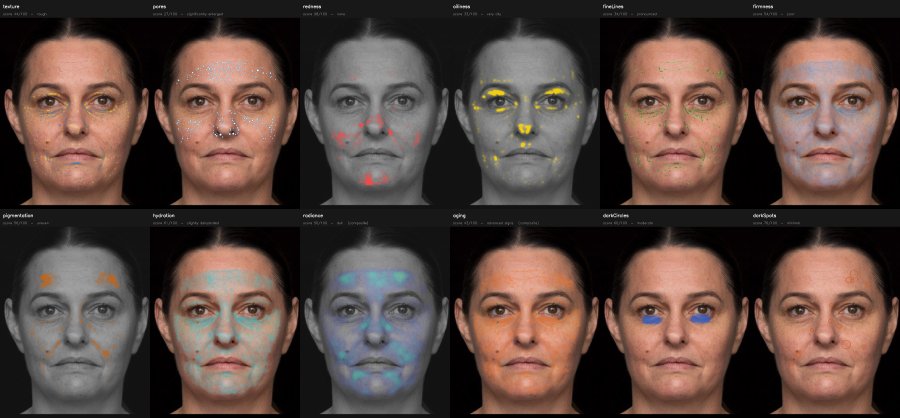
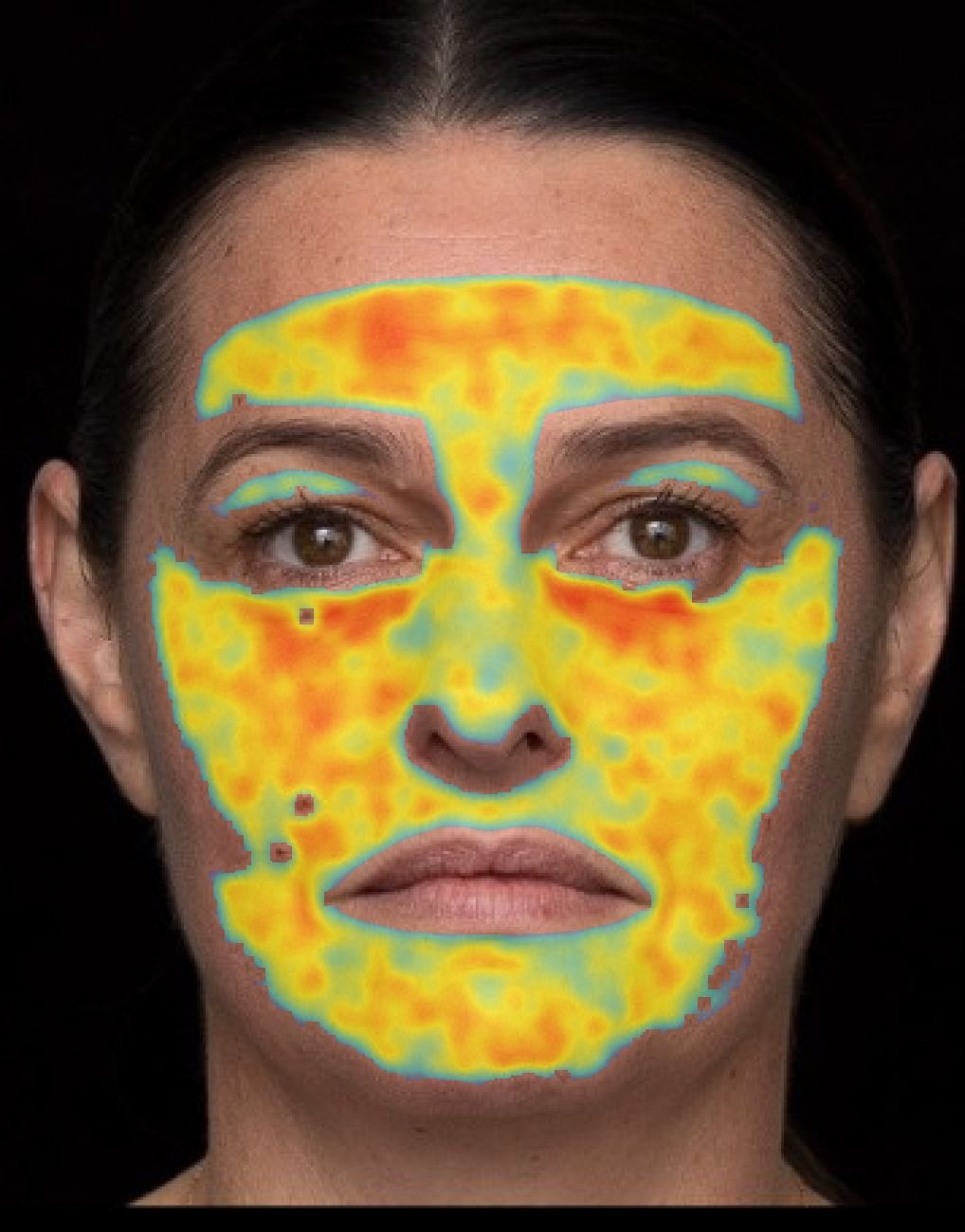
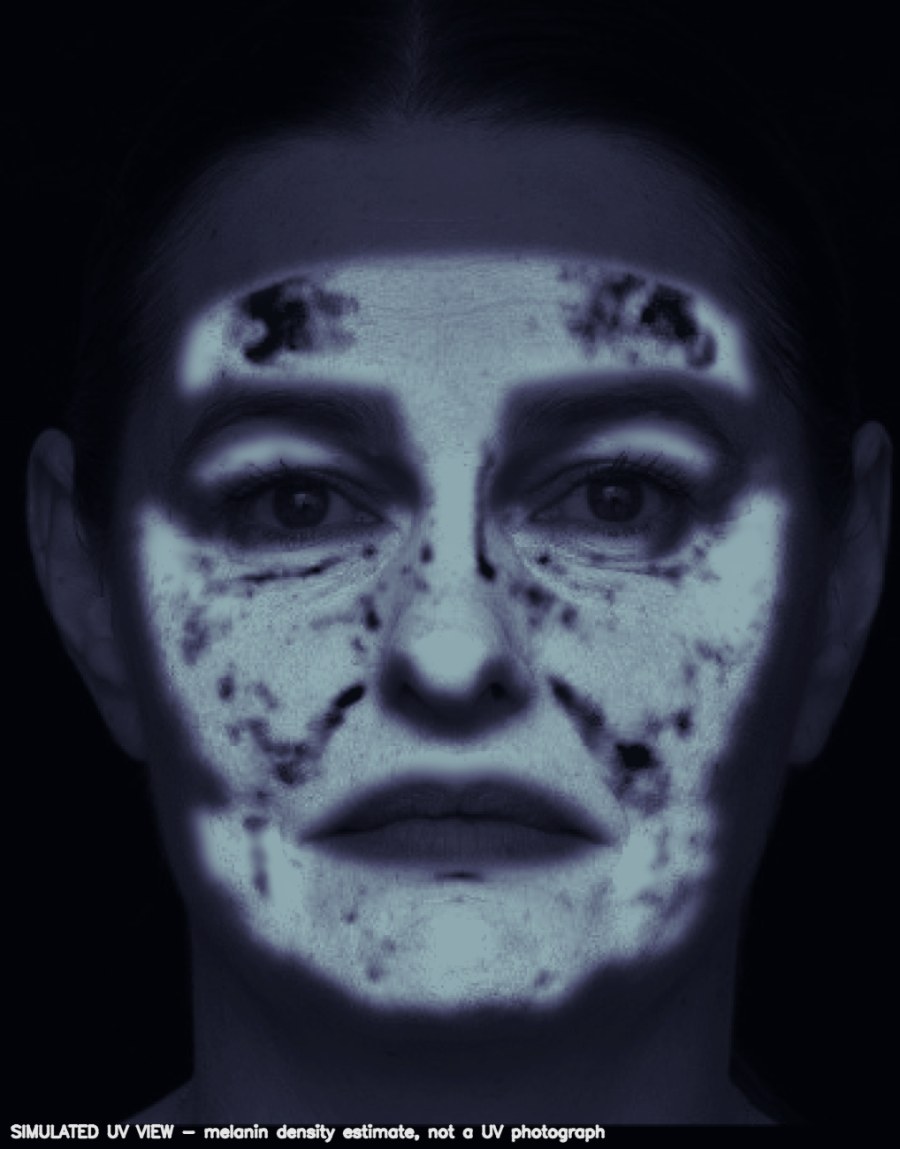
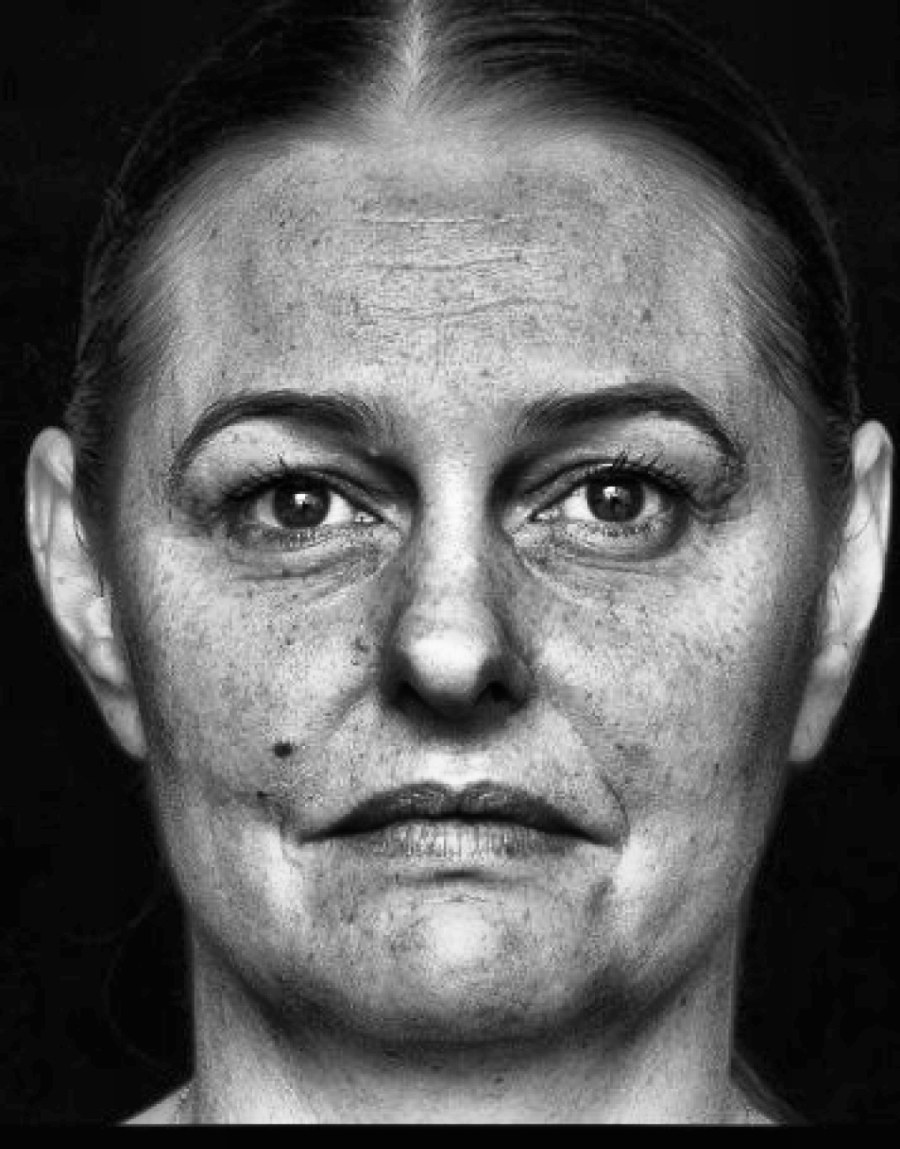
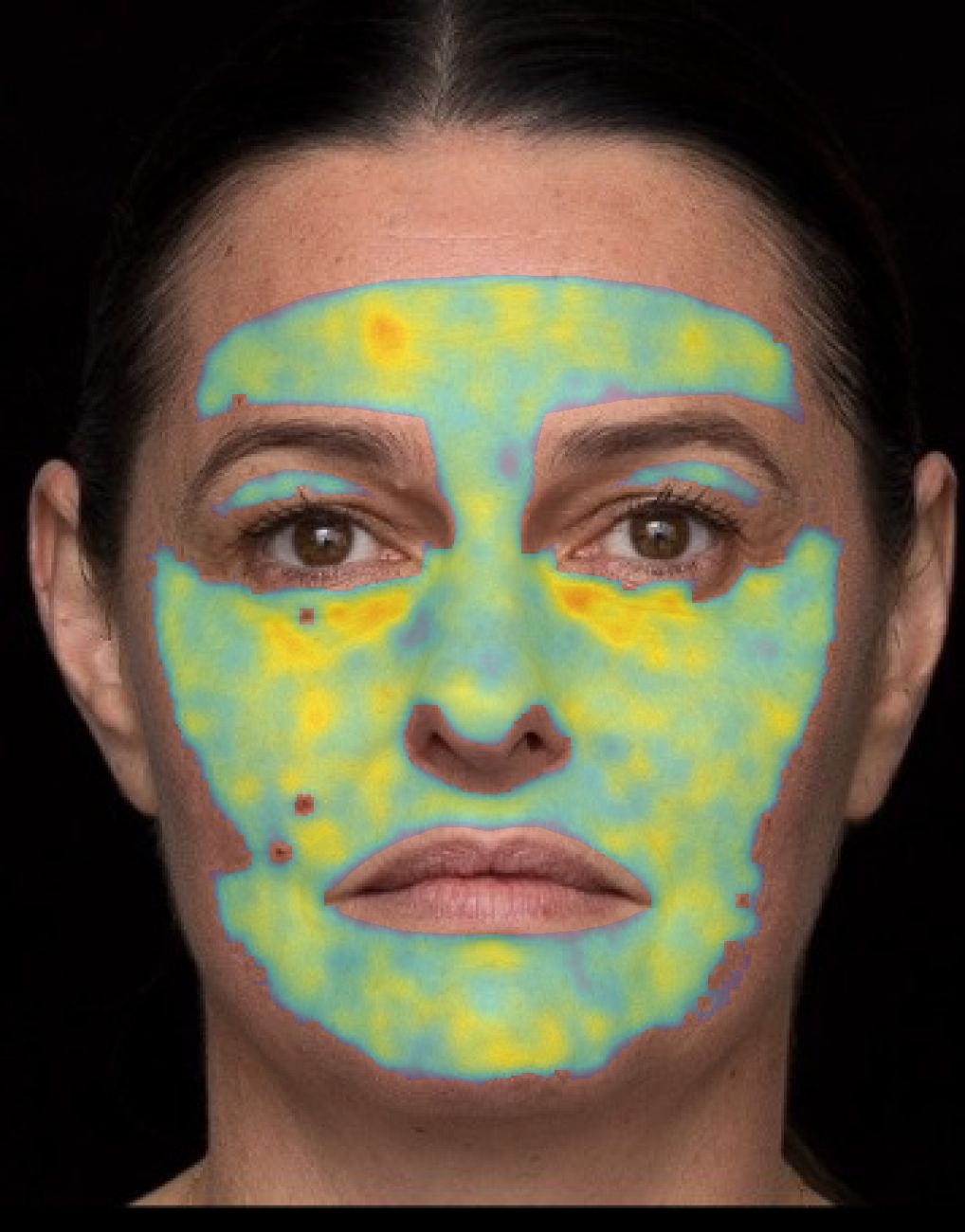
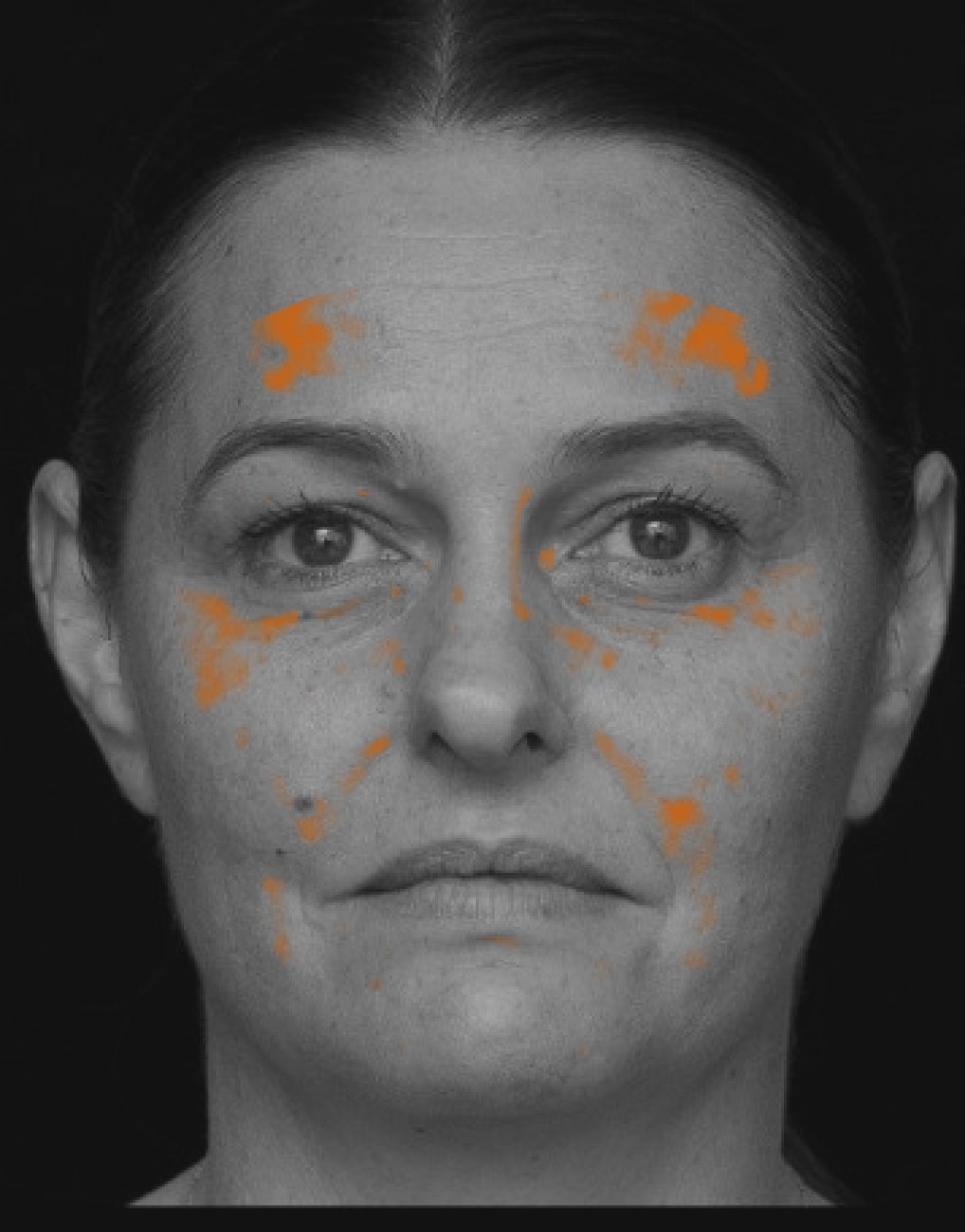
Individualised treatment simulations based on each client's face — treatment-specific outputs, client history and higher-value consultation conversations.
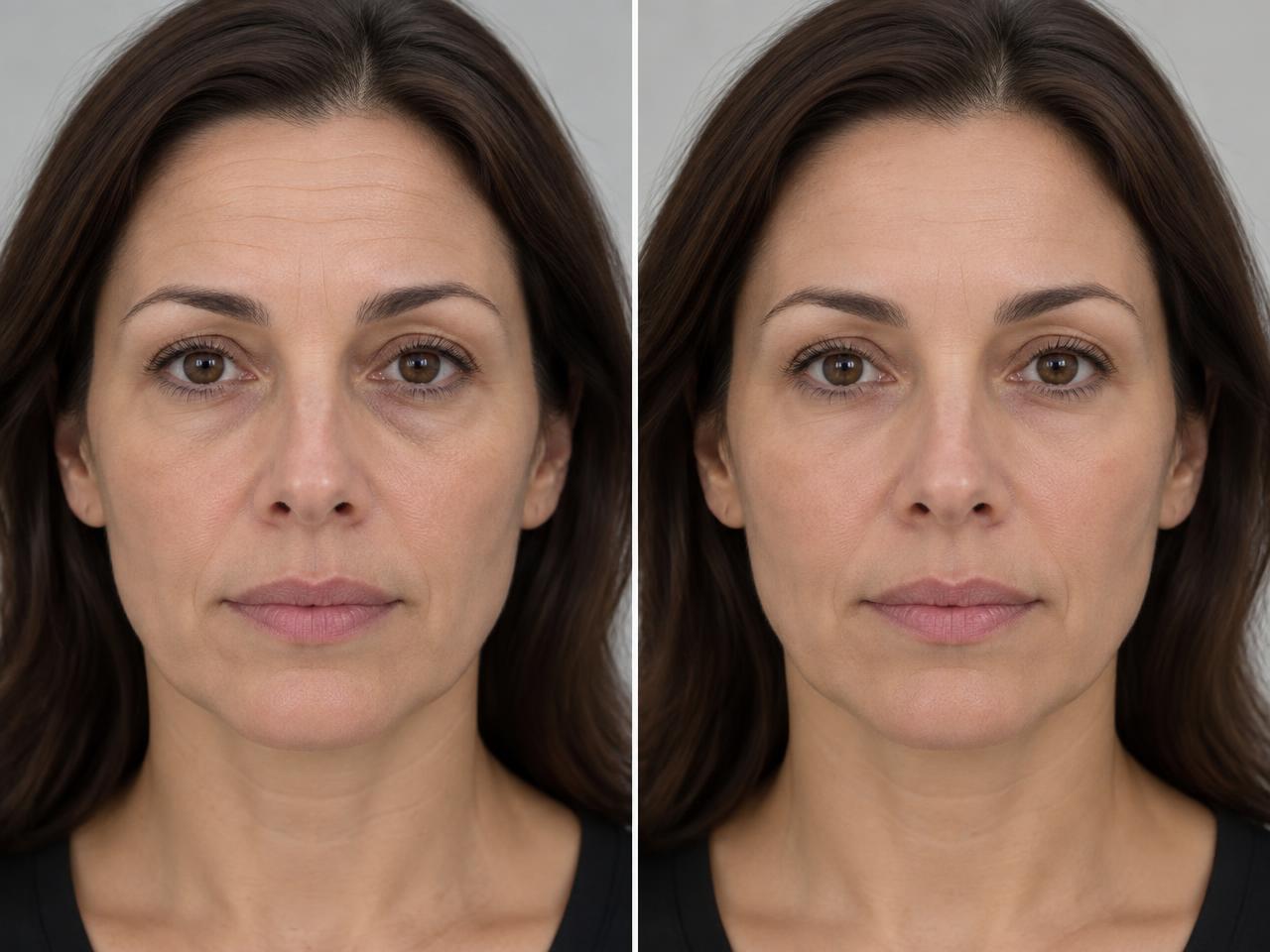
How the two work together
Scan the client with Facial Analysis Pro, let the AI recommend treatments from your clinic's own treatment list, then open Face Studio Pro with one tap — the client's photo, profile ID and chosen treatment are preloaded so you can simulate it immediately. Client profiles and history are shared across both tools.
Honest by design
Facial Analysis Pro is a cosmetic skin-quality assessment, not a medical diagnosis. Face Studio Pro produces illustrative appearance edits — every export is labelled as a simulation, and visual strengths describe the illustration, not a predicted treatment result.
Already own a Canfield VISIA? Keep using it.
Both Pro add-ons include Import from VISIA at no extra cost. Export the photo from your VISIA workstation — about ten seconds — and drop it straight into Facial Analysis Pro or Face Studio Pro. The view, lighting mode and client profile ID are read from the filename for you, standard white light, cross-polarized, parallel-polarized and UV exports are supported, and ScanSkinAI never connects to or changes your VISIA software. No integration project, no IT setup, no vendor lock-in.
Record the consultation while you scan. Voice Pro transcribes the conversation live, detects the language automatically and turns it into approved client insights linked to that client's scans and records.
Built for consultation rooms: press record, talk naturally, and let Voice Pro handle the notes while you focus on the client.
Speaks your clients' languages
Voice Pro detects the spoken language automatically — English, Spanish, French, German, Italian and Portuguese — and labels who is speaking, so multilingual consultations need no setup.
Simple, predictable hours
30 transcription hours every month covers roughly 60–90 typical consultations. Usage is settled once per session, and a 10-hour top-up is US$9 — no surprise bills.
Private by design
Audio is never stored — only the transcript text is kept, inside your private workspace. Clients give consent before recording, and you approve every insight before it reaches the client record.
Every consultation is transcribed live with speaker labels, so nothing the client said is forgotten once they leave the room.
Each recording links to the client's Facial Analysis Pro, Aesthetic or Body assessment and client record — the full story in one place.
Goals, concerns, treatment interests, budget and timing are drafted from the transcript. Nothing is saved to the client record until you approve it.
Start recording, then scan the client or open other tools — a small recorder bar stays on every page so you can pause, resume or stop anytime.
Works with the tools you already have
Voice Pro connects to Facial Analysis Pro, Facial Aesthetic Assessment, Body Assessment and your client records. Start a consultation straight from a finished scan report, and approved insights can shape the client's AI Care Plan. Available to active Enterprise owners as a separate monthly add-on.
Voice Pro supports consultation documentation — it does not provide medical advice, diagnosis or treatment recommendations on its own.
Use front and crown photographs to support more personalised conversations about styling, haircare routines and cosmetic services. The report highlights the analysed hair regions and keeps the discussion visual and easy to follow.


Experimental cosmetic estimates: Hair Scan describes visible hair appearance and does not diagnose hair or scalp conditions.
Short walkthroughs of the hosted scan page, every tool included with your Enterprise seat, and the optional Pro add-ons.
Your own branded facial-scan page — tracked links, QR codes, campaigns and named leads.
Guided body consultations with four-view photography, structured findings and private branded reports — included with every Enterprise seat.
Face-shape proportions, jaw and chin outline from a single frontal photo, with an AI-drafted consultation guide — included with every Enterprise seat.
Advanced 12-metric facial analysis with overlays, heatmaps and branded client reports — Pro add-on, $99/month per location.
Individualised facial simulations built from each client's own photo — Pro add-on, $99/month per location.
List unlimited approved benefit and treatment offers for Lavender cardholders, then verify member QR codes in-app — included with a paid Enterprise seat.
Whether you're an indie beauty brand, a growing salon, a boutique spa or a multi-room aesthetic clinic, ScanSkinAI gives every client a personalised, trackable skin story.
Let customers scan their skin in-store or online — then recommend your actual products matched to their scan results. Lift basket size and reduce returns.
Run quick AI facial scans at the front desk to recommend the right treatment or product before the session begins.
Document before-and-after skin metrics for facials, peels, laser and injectables — share progress reports with clients.
Give returning clients their own sub-account so they can see their skin journey unfold scan by scan.
Centralise scanning under one main brand account, then add VIP sub-accounts per location or therapist.
From indie beauty brands to busy clinic front desks — simple to start, easy to scale.
One flat annual fee per logged-in operator. No scan caps, no per-client charges, no counting usage — your team scans freely during real consultations on any tablet, phone or laptop.
Give your best clients their own tracking accounts so they can see their skin journey unfold scan by scan. Perfect for membership programmes, treatment packages, and loyalty retention.
Show clients measurable skin improvements with visual progress charts and population benchmarks. Staff can confidently upsell facials, peels, laser and injectable programmes using real data, not guesswork.
Use the iPad, phone or laptop you already have. Sign up, log in, and start scanning at the front desk or in the treatment room the same day. No IT team, no installation, no training course.
Meet our team at leading medical and wellness trade shows, or read the recap from where we've been showcasing our AI facial scan platform to global partners.
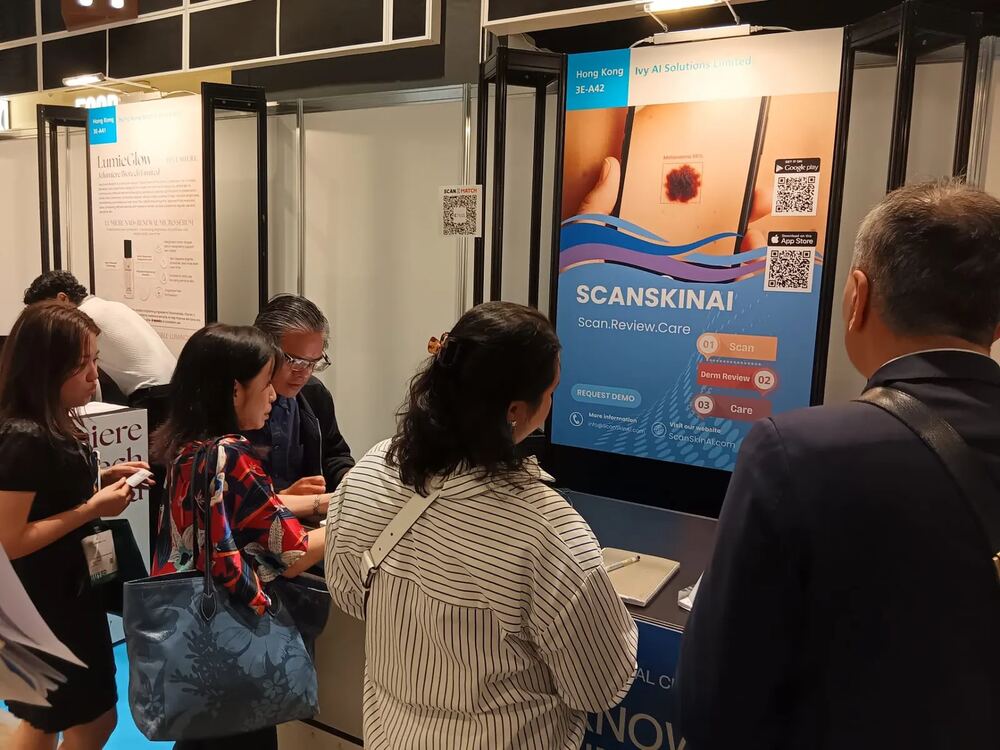
See ScanSkinAI live with our team in Hong Kong — running facial scan and skin analysis demos for aesthetic clinic buyers, medi-spa operators and wellness platform partners across Asia-Pacific.
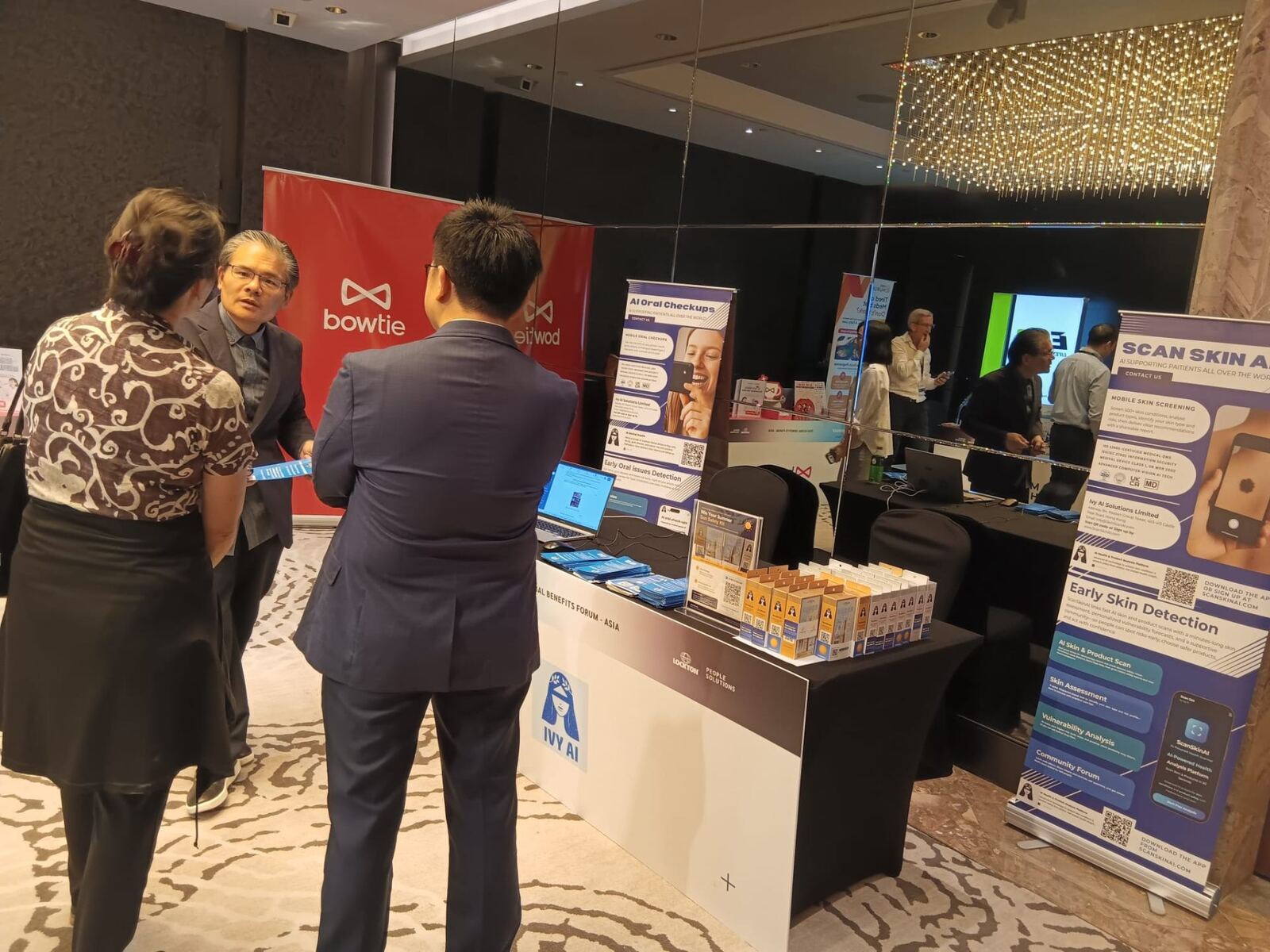
ScanSkinAI joined Lockton as a featured partner at the Global Benefits Forum, showcasing AI skin health analysis as a new employee benefit category for global insurers, brokers and HR leaders — including aesthetic and wellness coverage.
Want a private demo for your clinic, spa or platform team? Email info@scanskinai.com and we'll set up a 30-minute session.
Every operator is US$59.99 per year, billed annually, with the same included essentials and fair-use terms.
Unlimited scans based on fair use
Every logged-in staff seat gets unlimited facial and skin-condition scans under fair use, plus the complete Body Assessment consultation workspace. No per-scan charges, no Body Assessment usage charge and no hardware. Use it on any tablet, phone or laptop your team already owns.
What's included in every seat
This plan is for the in-store / in-clinic staff app — priced per operator seat.
Each seat is a logged-in staff account. Use it on a tablet at the front desk, a phone in the treatment room, or a laptop during a consultation. Add more seats anytime as your team grows.
Want the scan embedded on your customer-facing website, booking page or app?
That's a separate plan, priced on monthly scan volume (your clients run the scan themselves on their own phones). Just paste two lines of code into your site or booking page and the scan is live in about 5 minutes.
Email info@ScanSkinAI.com with your expected monthly traffic and we'll send a custom quote.
Need a custom number of seats, API access, or a hosted scan page on your own domain? Let's talk.
Give every WhatsApp group, Instagram post and in-salon poster a free AI skin scan behind it. Clients scan, you collect the lead, and the treatment plan writes itself.
Add your logo, accent colour, headline and intro copy. You get a public page like scanskinai.com/scan/your-clinic — no app, no login for your clients.
Generate tracked links and downloadable QR codes for WhatsApp, Instagram, Facebook, email, flyers and in-salon posters — each one tagged to its channel and campaign.
Clients take a selfie, see their skin score instantly, then enter name, email and mobile to unlock the full report. The lead lands straight in your dashboard.
Every new lead who opts in is synced to your workflow — create a GoHighLevel contact with a note, or trigger any Zapier Zap you build.
Send every consenting lead into a Zap, then route it to any app Zapier supports. Same fields as GoHighLevel: name, email, phone, note.
See leads by source and campaign, over any period, with share of leads, average skin score and growth vs the previous period. Export to CSV anytime.
Your treatment library is matched automatically to each client's skin metrics. Press one button to open a ready-to-send email — plan, pricing rationale and your clinic signature included.
Hosted scan pages run on their own credit pool — one credit per completed client scan. Credits never expire and top-ups are instant.
50 scans
$50
$1.00 / scan
500 scans
$299
$0.60 / scan
1,500 scans
$599
$0.40 / scan
4,000 scans
$999
$0.25 / scan
Available on paid Enterprise / Professional accounts. Purchase credits from your company dashboard.
Getting started takes minutes — choose the path that fits your business.
Need a custom plan instead? Email us at info@scanskinai.com

ScanSkinAI is built by Ivy AI Solutions Limited, a London-based health-tech startup headquartered at One Canada Square in Canary Wharf. We design our workplace skin cancer screening platform for UK small businesses, with UKCA Class I registration and ISO 27001 information security.
From our London HQ we support partners across the United Kingdom, Hong Kong, Singapore and the Asia-Pacific region — with clinical validation, enterprise security and dedicated integration support.
Send us your product list and service menu — we configure the AI to recommend your retail products and your in-spa treatments after every facial scan.
Mapped to real skin concerns
Hydration, oil, pigmentation, wrinkles, sensitivity, pores and texture — each scan triggers the matching shortlist from your own catalogue.
Your products, your services — not generic
Recommend the cleanser, serum, mask or SPF you actually stock, plus the facial, peel or treatment your team performs.
Lifts retail attach rate & rebookings
Clients leave with a clear next step — a take-home product and a follow-up service tailored to their result.
Fully white-labelled, we do the setup
Included as a value-added service for subscribers. No tech work on your side — our team handles the configuration.
How it works

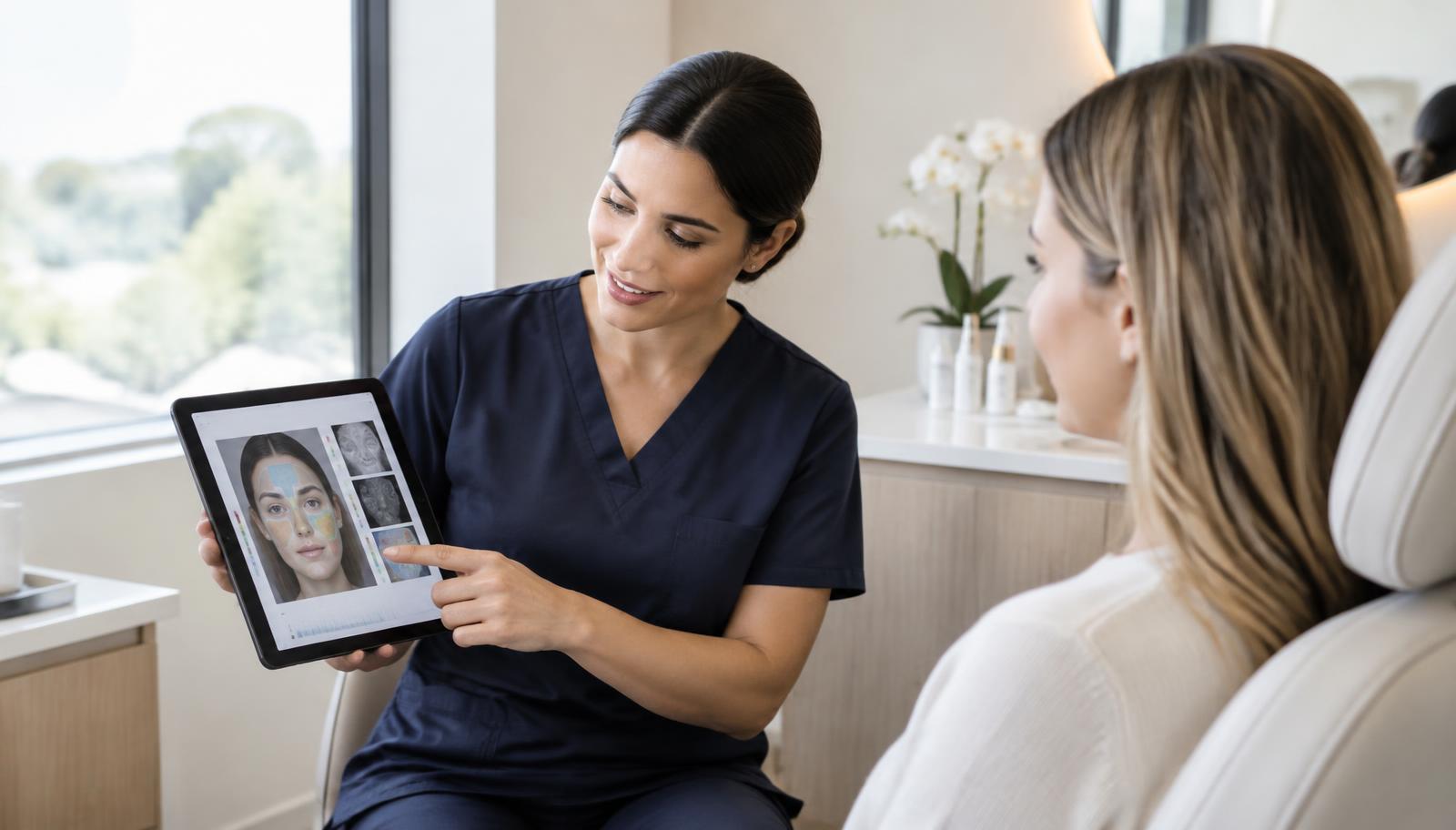
From scan to treatment plan — recommend the right procedure and homecare every time.
Personalised to each client. Powered by your own product & treatment menu.
Build a private history for each guest — link every facial scan to their profile and monitor skin changes across visits.
Run the Facial Scan for your client. Each result is saved separately with its own unique report number.
From your account dashboard, open the Tracker section to manage all your client profiles in one place.
Tap Create New Profile or Add Client. Use a name, initials or an internal client ID / reference for privacy.
Inside the profile, tap Add Scan or Link Existing Scan and choose the report by date or unique number, then save.
On the client's next visit, open their profile, tap Add Scan and link the new result to keep progress in one timeline.
Review results in the profile, or go to Account → Profile → History to see every scan report stored in your account.
Keep all facial scan results for the same client in one place and monitor changes over time — perfect for spas, aesthetic clinics and salons managing repeat treatments.
Most clinics compare a capital purchase with software that runs on the tablet they already own. Here is a practical breakdown of cost and what matters day to day.
Capital equipment
•$5,000–$25,000 up-front purchase or lease
•Service contracts, calibration and consumables
•Occupies a treatment room or dedicated station
•Staff training session before first client use
•Report usually stays inside the clinic
From $59.99/year
•No hardware, no installation, no per-scan fee
•Runs on the iPad, phone or laptop you already own
•12-metric client report in about 30 seconds
•First client scan typically within 10 minutes of sign-up
•Client-facing PDF report they can keep and share
One staff seat costs US$59.99 per year, or about US$5 per month when spread across the year. Compare that cost with your own consultation volume, average treatment value and rebooking rate. ScanSkinAI does not promise a particular uplift or payback period.
US$59.99/year
Cost for one logged-in staff operator
Fair use
Normal in-spa client consultations included
Your figures
Use your own prices and booking volume
Total cost of ownership
Add hardware, service contracts, consumables and per-scan fees — not just the sticker price.
Time to first client scan
If it needs a training day and a dedicated room, adoption stalls. Aim for same-day use.
Client-facing reporting
A report the client keeps and shares is what drives rebooking and referrals.
Consistency between visits
Scores must be repeatable enough to prove before-and-after progress credibly.
Lead capture and follow-up
Look for hosted scan pages, QR links and CRM or booking integrations (GoHighLevel, Zapier, Vagaro, Fresha).
Team seats and scale
Check how seats work for 3+ employees and whether multiple locations share one client history.
Playbooks, comparisons and tools to help you roll out AI skin scanning across your team.
Explore the optional ScanSkinAI Lavender Card and partner programme for approved, provider-funded member offers.
Model treatment attach lift and payback in 30 seconds.
Read moreReal numbers from spas, clinics and aesthetic boutiques.
Read moreCompare software-led facial analysis with dedicated VISIA hardware.
Read moreLaunch a branded client-facing scan link or QR journey.
Read moreConnect consenting scan leads to follow-up and booking workflows.
Read moreRollout, pricing, training and the first 90-day playbook.
Read moreApp-based scanners vs hardware systems compared.
Read moreScanSkinAI vs VISIA, Observ 520, Perfect Corp.
Read moreTurn one-off facials into 6-month memberships.
Read moreUse scan results to drive treatment and retail upsell.
Read morePair scans with facials, peels and LED treatments.
Read more60-min training, scripts and weekly coaching cadence.
Read moreSkin scanners, booking AIs and scheduling copilots.
Read moreThe Aesthetics & Spa plan is part of a wider B2B ecosystem. Different industry? There's a plan built for you.
Start with the overview of our AI skin analysis software, or see skin analysis software for clinics and white label skin analysis.
Overview of every ScanSkinAI plan for insurers, employers, clinics and wellbeing platforms.
Learn morePer-seat workplace skin cancer screening for SMEs with 1–99 employees. From $59.99/seat/year.
Learn moreEmbed AI skin screening into health, life and travel insurance products for member retention.
Learn moreEnterprise skin-health benefits for outdoor workforces and 100+ seat teams.
Learn moreAdd AI skin analysis to your existing wellbeing, telemedicine or beauty app.
Learn moreREST API, mobile SDK, MCP server and white-label widget for full embedding.
Learn moreScanSkinAI has been featured and discussed across health, wellbeing, workplace and technology publications.






Coverage and commentary only. No publication endorses or medically approves ScanSkinAI.
Join salons, spas and clinics using AI facial scanning to personalise consultations, prove treatment results and build the kind of loyalty no discount can buy.
ScanSkinAI — AI skin scanning for salons, spas and aesthetic clinics worldwide.
Practical guides on facial scanning, AI skin analysis and product recommendations — written for beauty brands, salons, spas and clinics.
Hardware booth vs app-based AI scanner, pricing models, and a 2026 buyer's checklist.
Read the guideUse cases, pricing tiers and a one-week launch plan for AI skin analysis in your spa.
Read the guideThe 5-step VIP rollout playbook — what to measure, cadence, retention math.
Read the guideA plain-English explainer for the question your clients always ask.
Read the guideFollow the step-by-step onboarding guide to publish your products and have them recommended after every facial scan — replacing the default Boots / Superdrug picks.
Open the onboarding guide →